Release 4.0
New Features
This release contains:
- the online ‘Direct Award Contract’ flow impacting both CPD Citizen and Admin
- additional change requests for the existing ‘Work Request’ flow impacting Citizen.
Direct Award Contract (DAC) flow
Citizen:
This online form replaces the current word document ‘DIRECT AWARD CONTRACT (DAC) FORM’.
It allows users to create and submit a DAC request directly to the CPD. Upon submission, the applicant will be issued an email acknowledgement containing a unique DAC request reference (e.g., DAC123).
Note that the email content can be configured in the Email Manager, for more information, refer to the DTT Template Administration user guide.
Admin:
The CPD Admin portal has been updated to accommodate the new DAC flow, which will act in much the same way as the Work Requests flow currently does.
DAC submissions will enter the system with a status of New, triggering an automated email to the configured email/mailbox for the DAC flow. Note that this email/mailbox can be configured in the Static Data Manager (setting type: To Static Email Dac); for more information, refer to the Static Data Administration user guide.
New submissions will be listed under the Transactions DAC -> New view.
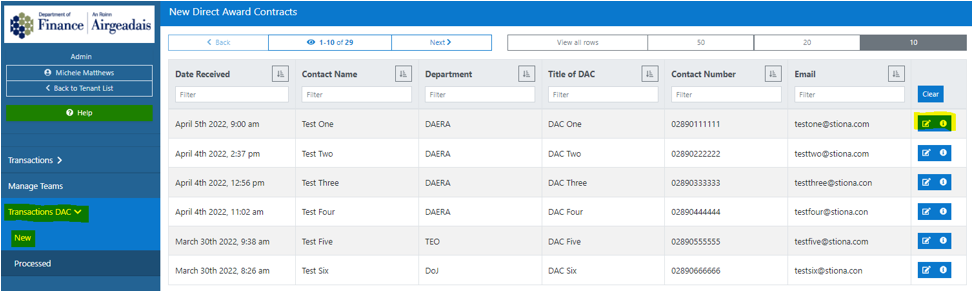 *
*On each DAC, Admin users have the ability to:
- View the submission
- Add Comments
- Update Status
- Generate Document

*
To generate a DAC as a word document
Click the Generate Doc action button - this will:
Create and download locally the details of the application into the current word document format. The admin can then save, edit, distribute the file as required.
Note: where section 3 is not filled in by the applicant, the system will enter n/a.
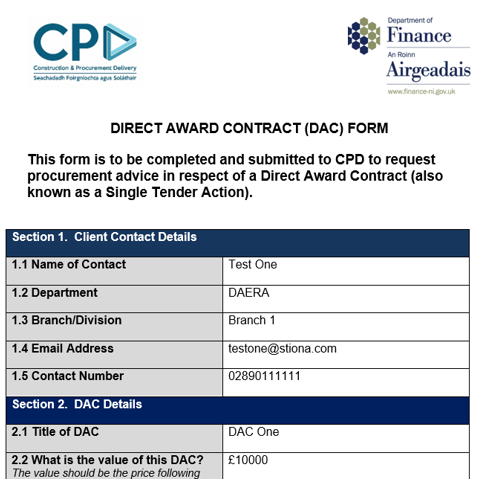
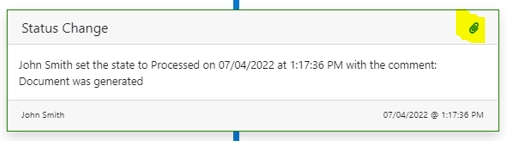
The system will automatically set the DAC status from New to Processed and record the action in the History.
A link to the doc will be available from its corresponding History entry by clicking on the paperclip icon.
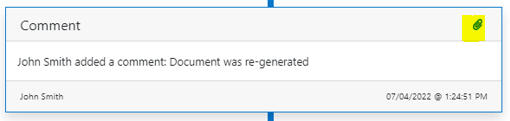
Admin users maintain the ability to re-generate the document again on Processed DACs. Each doc generated will have a unique filename and be recorded against the History.
Work Request (WR) flow
Allow names to be entered on multiple lines - Freshdesk #4183
In the 'Conflict of Interest' section of the Work Request flow, users can now enter text on multiple lines for the following field:

Note that text will appear on one line on the Admin side.
Allow numbers to be entered in Business Area field - Freshdesk #4135
In the 'Your Contact Details' section of the Work Request flow, users can now enter numbers as well as text into the Business Area field.

Known issues
The following issues have been identified in the DAC citizen form and will be fixed in the next release:
- The validation on Section 3 Date fields has not yet been fully completed,
- users will be able to skip the dates, but only if they skip both start date and end date. If they insert either, the other one will become mandatory.
- Also note, where the dates are left empty, the default windows date (January 1st, 1970) will be displayed on the Admin ViewDetailsDac view for this section but the Generated Doc will be correctly populated with n/a (34871).
- If the user fills in Section 3 on the form, then selects the option where Section 3 is not required, the information they filled in is still displayed on the DAC summary page at the end of the flow (34782).
- If the user changes their answer to the question in Step 2 after reaching Summary and then uses the task list to return, they can bypass completing step 3 (34950)
Bug Fixes
There were no bug fixes included in this release.